Turn PDF into CSV Instantly, With 99.8% AI Accuracy
Drop any PDF and turn it into clean, structured CSV data in seconds. Parsinto's zero-shot AI handles scanned documents, complex tables, and bulk files no manual entry no templates no setup.
Files deleted instantly· Results in seconds
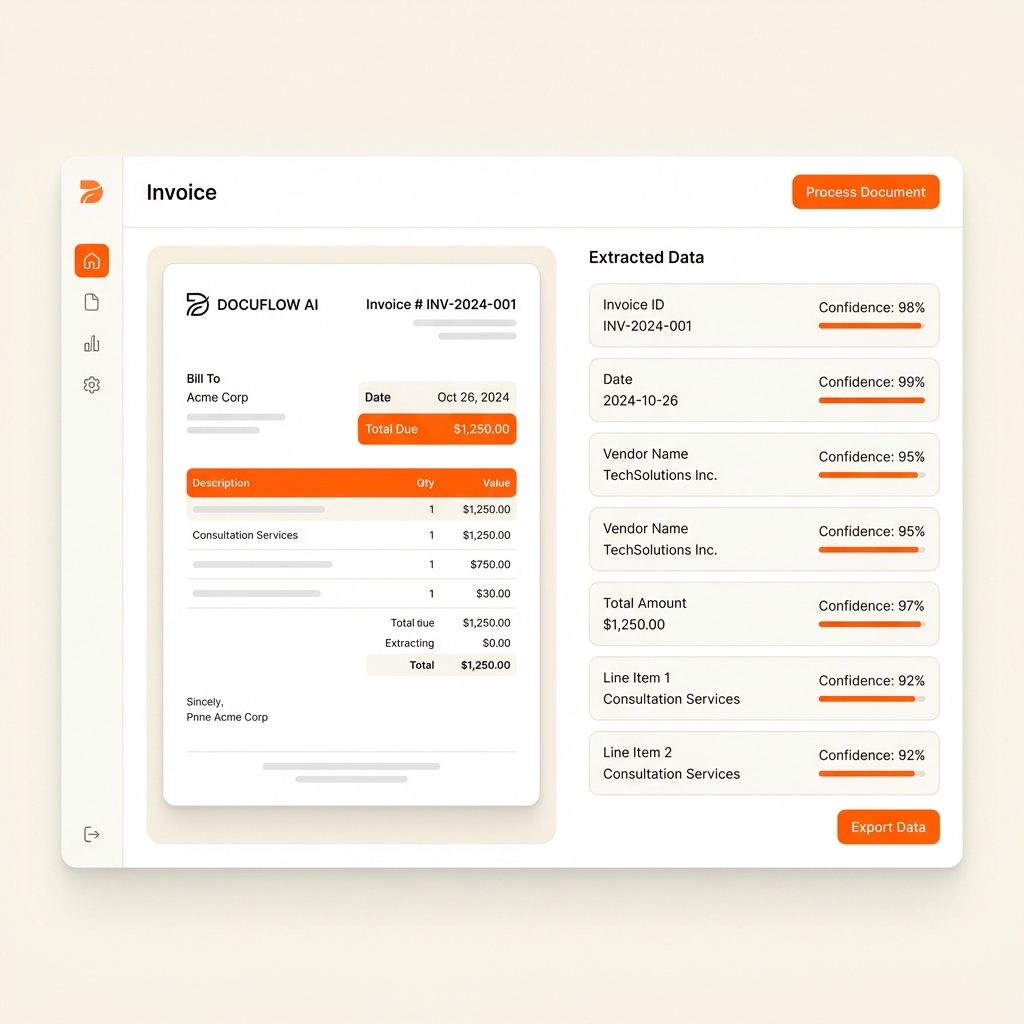
From PDF to Structured Data in Under a Second
Watch Parsinto automatically turn a messy invoice PDF into clean JSON or CSV with no manual setup.
Product Demo
See how Parsinto transforms your documents
How to Turn a PDF into a CSV File
Turning a PDF into a CSV means extracting the tabular data locked inside a non-editable document and transforming it into a structured spreadsheet format you can actually use. Whether you're dealing with scanned invoices, multi-page financial reports, or image-only bank statements, Parsinto's AI turns your PDF into CSV data automatically — no manual copying required.
For accountants, analysts, and operations teams, Parsinto eliminates hours of manual typing by using zero-shot AI to recognize rows and columns precisely. Even documents with irregular formatting, merged cells, or missing borders are turned into analysis-ready CSV data without any intervention.
How to Turn a PDF into CSV in 3 Steps
Upload Your PDF
Drag and drop any PDF — a scanned invoice, a bank statement, a financial report — into Parsinto. Digital and image-based PDFs are both supported.
AI Reads the Structure
Parsinto's zero-shot AI automatically identifies every table, column header, and data row in your PDF. No template setup, no field mapping, no configuration.
Download Your CSV
Review the extracted data and download as a clean CSV file. Open it directly in Excel, Google Sheets, or import into any database or ERP system.
You can turn a PDF into a CSV file entirely online — no software download, no browser extension, no account required. Parsinto processes your file in the cloud and returns a clean, structured CSV output in under 10 seconds for a standard document.
Need to turn a scanned PDF into CSV? Parsinto handles image-based files automatically using built-in OCR — there is no extra step or separate upload flow. Upload the scanned PDF the same way you would a digital one and the AI takes care of the rest.
For teams needing to turn large batches of PDFs into CSV files — hundreds of invoices from multiple suppliers, monthly bank statements, or quarterly reports — Parsinto's batch mode processes all files in parallel and can merge every output into a single master CSV with one click.
Turn Scanned PDFs into CSV with AI-Powered OCR
Not all PDFs are created equal. Many documents — receipts, paper invoices, printed bank statements — are saved as images or scanned files. These "flat" PDFs contain no selectable text, making traditional copy-paste extraction impossible.
Parsinto's built-in OCR engine automatically detects image-based pages and turns them into structured CSV data with contextual AI — not just raw character recognition. Even low-resolution scans, rotated pages, and stamped watermarks are handled cleanly, giving you analysis-ready CSV output you can use immediately.
Why Use Parsinto to Turn PDFs into CSV?
The professional choice for reliable, scalable data extraction.
Fast Processing
Turn any PDF into structured CSV in seconds — not minutes.
99.8% Accuracy
Precision table detection handles merged cells, missing borders, and complex layouts.
Bank-Grade Security
SSL encryption on all transfers. Files deleted immediately after extraction.
No Software Needed
Runs entirely in your browser. Nothing to install, configure, or maintain.
Batch Conversion
Turn hundreds of PDFs into CSV at once and merge outputs into one master file.
How It Works — 3 Simple Steps
Turn any PDF into CSV in under a minute.
Upload PDF
Drag and drop any PDF — digital, scanned, or multi-page — into the secure upload area.
AI Extracts Data
Zero-shot AI identifies tables, headers, values, and structure without any templates or rules.
Download Your CSV File
Review your clean, structured data and download as CSV, Excel, or JSON — ready to use in any tool.
Features Built for Accuracy
Smart Table Detection
No more merged cells or broken columns. The AI understands row boundaries regardless of PDF structure.
Scanned PDF Support (OCR)
Turns non-searchable, image-based PDFs into fully structured, editable CSV data automatically.
Batch Processing
Turn multiple PDFs into CSV at once and merge all outputs into a single master spreadsheet.
Zero-Shot AI — No Templates
Intelligent header recognition even for non-standard layouts. No training or setup required.
Flexible Export Formats
Download as CSV, Excel (.xlsx), or JSON — whichever format your workflow needs.
| Date | Description | Debit | Credit | Balance |
|---|---|---|---|---|
| 2026-02-01 | AMAZON.COM | $49.99 | $3,240.18 | |
| 2026-02-03 | DIRECT DEPOSIT | $4,200.00 | $7,440.18 | |
| 2026-02-05 | NETFLIX | $15.49 | $7,424.69 | |
| 2026-02-07 | CHASE MORTGAGE | $1,842.00 | $5,582.69 | |
| 2026-02-10 | REFUND — APPLE | $9.99 | $5,592.68 |
Parsinto vs Manual Data Entry
Every hour spent copying PDF data by hand is an hour lost.
| Metric | Manual | Parsinto AI |
|---|---|---|
| Conversion speed | 15–30 min / file | Under 3 seconds |
| Accuracy | ~94% (human error) | 99.8% |
| Scanned PDFs | Not possible | ✅ Built-in OCR |
| Batch processing | ✅ Unlimited | |
| Zero-shot AI (no templates) | ✅ | |
| CSV, Excel & JSON export | Manual copy only | ✅ All formats |
| Cost per 100 pages | $60–$120 labor | From $0 |
| Setup required | Hours | None |
Who Needs to Turn PDFs into CSV?
Tailored solutions for every industry professional.
Accountants
Turn bank statement and invoice PDFs into CSV — import directly into accounting software with zero manual entry.
Financial Analysts
Grab financial tables from annual reports and earnings PDFs instantly for modeling and valuation.
Operations
Turn inventory lists, packing slips, and logistics PDFs into actionable CSV spreadsheets.
Legal Professionals
Extract structured data from court records and contracts for faster evidence review.
Developers
Ingest clean CSV outputs directly into custom workflows, pipelines, and databases.
Frequently Asked Questions
Does it work with scanned PDFs?
Yes. Parsinto includes built-in OCR that reads and extracts data from image-based and non-searchable scanned PDFs automatically.
Is my data secure?
Absolutely. All file transfers use bank-grade SSL encryption. Your files are permanently deleted from our servers immediately after conversion — we never store or share your data.
How accurate is the PDF to CSV conversion?
Parsinto achieves 99.8% accuracy on standard tabular data. The AI is trained to recognize table borders, alignment, merged cells, and multi-line cell content.
Can I convert multiple PDF files at once?
Yes. Parsinto supports bulk uploads. Upload multiple PDF files and download them as individual CSVs or merge them into a single master file.
How do I turn a PDF into a CSV file?
To turn a PDF into a CSV with Parsinto: (1) upload your PDF, (2) the AI automatically detects all tables and structured data, (3) download as clean CSV. The entire process takes under 10 seconds. No account, software, or setup required.
Can I turn a PDF into CSV without any software?
Yes. Parsinto runs entirely in your browser — nothing to install or configure. Upload your PDF and it turns into a structured CSV automatically. Works on any device.
Can I turn an invoice PDF into a CSV with line items?
Yes. Parsinto extracts vendor name, invoice date, invoice number, line items (description, quantity, unit price, total), tax, and grand total — each as a correctly labeled CSV column. Works on both digital and scanned invoice PDFs.
What format is the CSV output in?
The CSV output uses UTF-8 encoding with comma-delimited columns — the default format accepted by Excel, Google Sheets, QuickBooks, Xero, and most databases. Column headers are auto-detected. You can also export as Excel (.xlsx) or JSON.
Simple, transparent pricing plans.
Mini
For small teams.
- 1 credit = 1 page
- 100 credits / mo
- 90 days Document Retention
- Priority email support
Advanced
For advanced users.
- 1 credit = 1 page
- 600 credits / mo
- 90 days Document Retention
- Priority email support
Pro
For growing teams.
- 1 credit = 1 page
- 10,000 credits / mo
- invite your team
- Extended Document Retention
- Priority email support
- Can buy more credits
Enterprise
For large organizations.
- Unlimited documents
- Unlimited storage
- Dedicated account manager
- Custom SLAs
See your Return on Investment
Manual data entry costs roughly ~$2.50 per invoice in labor. At 500 invoices/month, Parsinto saves you ~$1,150 every month compared to manual entry.
What is a page?
1 PDF containing 50 pages counts as 50 units. We only charge for successfully processed pages.
More Document Extraction Solutions
Ready to Turn Your PDFs into CSV?
Parsinto turns any PDF into clean, structured CSV in seconds — scanned or digital, one file or a thousand.
✓ Files deleted instantly · ✓ 99.8% accuracy
Turn Your PDF into CSV Now